How to pass KYC verification on the first try
Identity verification is the one step in opening an exchange account that can genuinely stall you — not because it's hard, but because a blurry photo or a small mismatch gets bounced and you have to start over, sometimes after a wait. The whole thing is much easier than it looks once you know what the system is actually checking for. Here's how to get it right on the first attempt, plus how to fix it fast if a submission gets rejected.
KYC stands for "know your customer." It's the identity check that regulated exchanges are legally required to run before they let you move real money — the same family of anti-money-laundering rules your bank follows. You'll be asked to upload a photo of a government ID and, almost always, to take a quick selfie or a short "liveness" video so the platform can confirm the face matches the document and that a real person is present. It can feel intrusive to hand over your ID to an app, but it's worth reframing: an exchange that runs proper KYC is one operating inside the rules, which is exactly the kind you want holding your money. The platforms that skip it are the ones to be wary of.
Use a current, undamaged ID; type your details to match it exactly; photograph it flat in good daylight with no glare; do the selfie bareheaded looking straight at the camera. Get those four right and you'll clear most verifications on the first pass.
Which documents actually work
Most exchanges accept the same short list of government-issued photo IDs, and the choice between them matters more than people expect. In rough order of how smoothly they tend to go through:
- Passport. Usually the most reliable choice. It's designed to be machine-read, the photo page is a single clean layout the verification systems know well, and it's recognised across borders — handy if your account region and your nationality differ. If you have a passport, reach for it first.
- National ID card. Where it exists, this is just as good as a passport and often quicker to photograph because it's a single small card. Capture both sides if asked.
- Driver's licence. Widely accepted and fine for most people. Just be aware some systems are fussier about licences because layouts vary so much by region, so the photo quality matters that bit more.
Whatever you pick, two non-negotiables: it must be current (not expired, even by a day) and undamaged (no cracks across the photo, no worn-off text). If your only ID expires next month, it's genuinely worth renewing before you start — an expired document is a guaranteed rejection, and there's nothing you can do to photograph your way around it. Also make sure the name, date of birth, and other details on the document are legible in the final photo, not just to your eye but to a camera that has to read every character.
Photographing the ID: lighting and framing
This is where most first-try failures actually come from. The verification system needs to read every character on the document and see the security features clearly, and a surprising number of submissions fall down on simple photo problems. A few minutes of care here saves you a restart.
- Use natural daylight, not a flash. A flash bounces straight back off the laminated surface of an ID and washes out a stripe of text or the photo — the single most common photo fault. Daytime light from a window, with the ID flat on a surface, gives an even, glare-free image. If it's dark, a bright room light positioned to the side (not directly overhead) works; just check the preview for any white hotspots before you submit.
- Lay it flat on a plain, dark surface. A dark wood table or a sheet of dark paper makes the edges of the document pop, which helps the system detect all four corners. Avoid busy or reflective backgrounds.
- Get all four corners in the frame with a little margin around them. A cropped corner often triggers a rejection because the system can't confirm the document is whole.
- Hold the camera parallel and steady. Shoot straight down, not at an angle, so the rectangle stays a rectangle. Tap to focus, and check the result is sharp enough to read the smallest print before you submit. If your hands shake, prop your elbows on the table.
- No fingers, no shadows over the text. Keep your fingers off the printed area, and make sure your own shadow (or the phone's) isn't falling across the document.
If the app gives you a live capture frame rather than letting you upload a photo, line the document up inside the on-screen guide and hold still until it captures automatically. That guided mode usually produces a cleaner result than a free-hand photo, so prefer it when it's offered.
The selfie and liveness check
After the document, you'll do a selfie or a short video to prove you're a real, present person and that your face matches the ID photo. It's quick, and the same lighting logic applies.
- Good, even light on your face. Face a window or a soft light source; don't sit with a bright window behind you, which throws your face into shadow. The system needs to see your features clearly.
- Nothing covering your face. No hat, no sunglasses, no mask. If you wear glasses, some systems ask you to remove them to cut glare — follow the prompt.
- Look straight at the camera and follow the on-screen instructions slowly. A liveness check may ask you to turn your head, blink, or move closer; do each motion gently and wait for the prompt to advance rather than rushing through.
- Plain background, neutral expression. You don't need to smile or pose — a clear, front-on, neutral shot is what matches a passport photo best.
If the liveness check fails repeatedly, it's almost always lighting or movement: too dark, too much glare on glasses, or moving faster than the prompts. Slow down, fix the light, and it usually passes on the next go.
Proof of address, when it's asked
Some exchanges, or some account tiers and regions, ask for a separate proof of address on top of your ID — a document showing your name and home address. This trips people up more than the ID itself, because the rules are specific. What's usually accepted:
- A utility bill (electricity, gas, water, internet) showing your name and address.
- A bank or credit-card statement.
- An official government letter (tax, council, or similar).
The details that get these rejected are predictable, so check them before uploading: the document is usually required to be recent (often within the last three months — check the platform's stated window), it must show your full name and full address matching what you entered, and the address has to be the same one on your account. A phone bill is sometimes excluded because it doesn't prove a physical address. Upload the whole document, not a cropped corner — the system wants to see the issuer's name, the date, and your details together. A clear photo or the original PDF both work; a screenshot of an online account page is often rejected, so download the proper statement instead.
The golden thread through all of KYC is consistency. The name on your account, your ID, and your proof of address should be the same — same spelling, same order, no nickname on one and your legal name on another. Most rejections are a mismatch somewhere in that chain, not a fraud flag. Line them up before you submit and you remove the most common failure in one move.
Why verifications get rejected (and how to fix each)
If you do get bounced, don't blindly re-upload the same thing — the exchange usually tells you roughly why, and fixing that specific cause is far faster than guessing. Here are the common reasons and the fix for each:
- Detail mismatch (the most common). A typo in your name, a transposed birth date, or an address that doesn't match the document. Fix: re-read every field against the ID, character by character, and correct the entry — not the photo.
- Glare or blur on the ID. Text the system can't read. Fix: reshoot in daylight, flat, no flash, and zoom in on your own photo first to confirm the small print is sharp.
- Cropped or partial document. A missing corner or cut-off edge. Fix: reframe with margin around all four corners.
- Expired or unsupported document. Fix: use a current ID; if it's expired, renew it — there's no workaround. If the document type isn't supported in your region, switch to one that is (often a passport).
- Selfie doesn't match or liveness failed. Fix: redo the selfie in better light, bareheaded, glasses off if prompted, moving slowly through the steps.
- Proof of address too old or wrong type. Fix: use a document within the platform's date window, of an accepted type, showing your full matching address.
- Name genuinely differs from your ID — after marriage, a legal change, or a translation/transliteration difference. Fix: this is the one case where you may need supporting paperwork (a marriage or deed-poll certificate) and a word with support. It's solvable; it just needs the document that bridges the two names.
One reassuring note: a rejection is almost never an accusation. The systems are automated and strict by design, and most bounces are mundane photo or data issues, not a suspicion that you're up to something. Treat it as a "please redo that bit" rather than a verdict, fix the named cause, and resubmit.
How long it takes
When everything's clean, verification is often a matter of minutes — sometimes near-instant, as automated checks read your document and match the selfie on the spot. At busy times, or when a submission needs a human reviewer (common with proof-of-address or a flagged mismatch), it can stretch to a few hours or a day or two. That's normal and not a sign anything's wrong. The figures vary by exchange, region, and how busy the queue is, so treat any specific number you see as a rough 2026 guide rather than a promise, and check the platform's own status if it's taking longer than you expected.
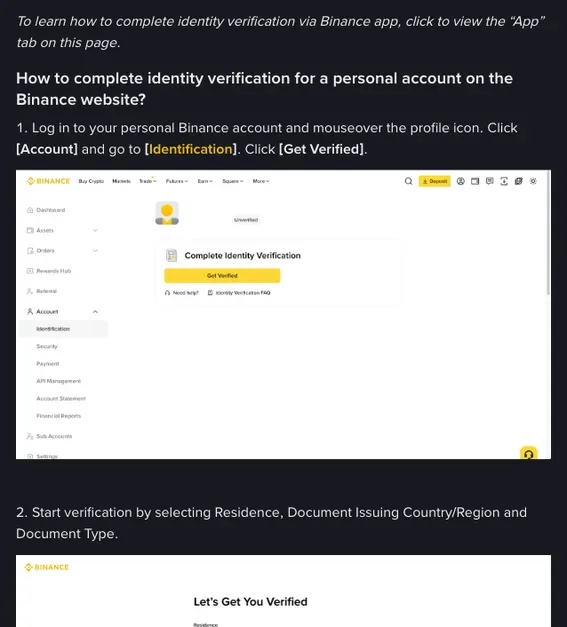
A practical tip: do your verification when you've got a few minutes of good daylight and aren't rushing to deposit. On Binance, for example, a new account can't deposit or trade until it's verified, so getting KYC done early — ideally right after you secure the account with 2FA — means there's nothing blocking you when you're ready to fund. Our step-by-step account-opening guide puts the whole sequence in order, and the security guide covers the 2FA setup that should come just before this step.
How your data is handled
It's reasonable to feel cautious about uploading your passport and a video of your face. A few honest points to set expectations. Regulated exchanges collect this information because anti-money-laundering law requires them to, and they're generally bound by data-protection rules — in Europe that's the GDPR framework — which limit how your data can be used and stored and give you rights over it. Many exchanges use specialist third-party verification providers to process the documents, which is standard practice in the industry. You can read any platform's privacy policy to see exactly what's collected, who processes it, and how long it's kept; it's worth a skim before you upload.
What you can do on your side: only ever submit your documents inside the official app or on the genuine website, never via a link someone sends you or a "support agent" who offers to verify you faster. No legitimate process asks you to email your ID to a person or hand over your password to get verified. If anyone contacts you offering to speed up your KYC in exchange for details, that's a scam — real verification happens entirely within the platform. The U.S. FTC keeps a useful page on protecting your personal information if you want the general consumer guidance, and our guide to spotting crypto scams covers the impersonation tricks specifically.
Get the document clean, the details matching, and the selfie well-lit, and KYC stops being the scary gate it first appears to be — it becomes the five-minute step it's meant to be. Once you're approved you normally won't redo it — unless the exchange asks you to update your details, for example when your ID expires or local rules change. If you're picking up from here, our first-crypto walkthrough takes you from a verified account to your first order.
FAQ
Why do I even have to do KYC?
Regulated exchanges are legally required to verify who their customers are, under anti-money-laundering rules — the same reason a bank checks your ID. It's not optional on a compliant platform, and a service that skips it is one to be cautious about. The upside is that an exchange running proper KYC is operating inside the law.
Which document is best to use?
A passport, where you have one — it's machine-readable, has a single clean layout the systems know well, and works across borders. A national ID card is just as good and quicker to shoot. A driver's licence is widely accepted but, because layouts vary so much, photo quality matters a little more. Always use a current, undamaged document.
My verification was rejected — what now?
Read the reason the exchange gives and fix that specific thing rather than re-uploading the same submission. Most rejections are a detail mismatch (a typo against your ID) or a photo issue (glare, blur, a cropped corner). Correct the named cause and resubmit. A rejection is almost always a "redo that bit," not an accusation.
How long does verification take?
Often minutes when the submission is clean and the automated checks can read everything. At busy times, or when a human reviewer is needed (common for proof-of-address), it can take a few hours to a day or two. Times vary by exchange and region, so treat any specific figure as a rough guide and check the platform's status if it runs long.
My name has changed since my ID was issued. Will it fail?
Not necessarily, but a plain name mismatch is a common rejection. If your account name differs from your ID — after marriage, a legal change, or a transliteration difference — you may need a supporting document (like a marriage or deed-poll certificate) and a word with support to bridge the two. It's solvable; it just needs the paperwork that connects them.
Is it safe to upload my passport and a selfie?
On a regulated exchange, the data is collected because the law requires it and is generally covered by data-protection rules that limit its use and give you rights over it. Only ever submit inside the official app or genuine site — never via a link or a "support agent" offering to verify you faster, which is a scam. Read the platform's privacy policy if you want the specifics on storage and processing.