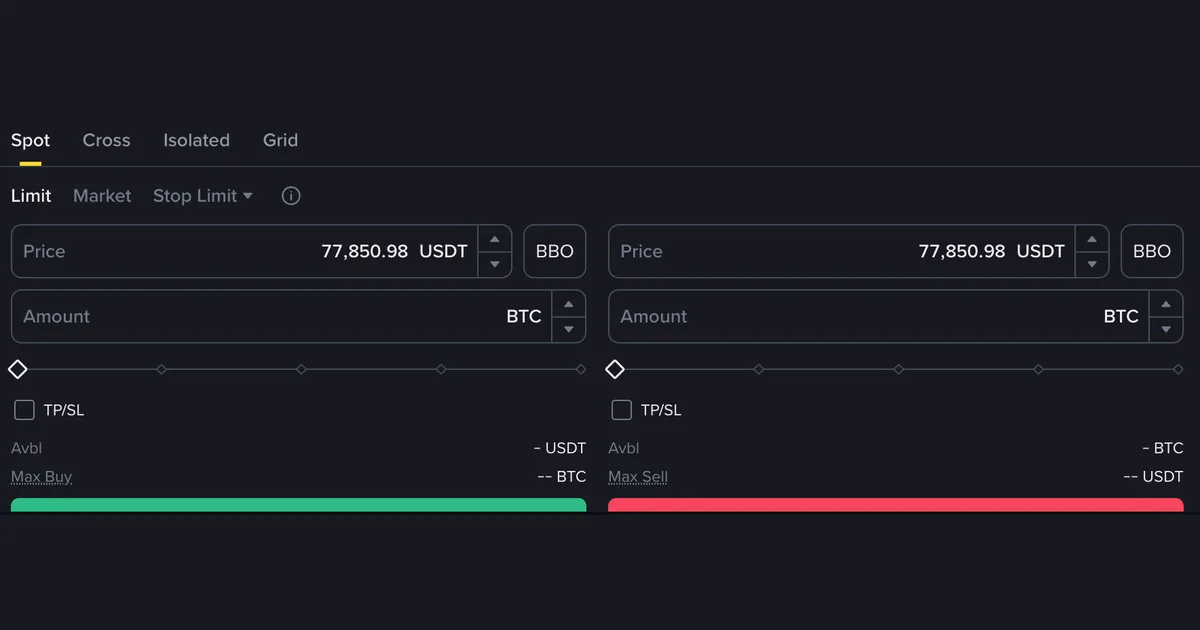
How to choose between market, limit and stop-limit orders
The account is open, the money has landed, and the trading screen asks a question nobody warned you about: Limit, Market, or Stop Limit? Three tabs, no explanation, a green button waiting underneath. Here's the practical answer — which tab to press for what you're actually trying to do, what each one quietly costs you, and why the stop-limit goes wrong on the first try.
Short answer first. A market order fills right now, at whatever the market is offering that second. A limit order fills at the price you named, or it doesn't fill at all. A stop-limit order sleeps until the price touches a trigger you set, and only then places a limit order for you. The rest of this is about which trade-off you want on a given day.
First, read the panel in front of you
The picture above is a real spot order panel, and nearly everything you need is in it. The top row (Spot · Cross · Isolated · Grid) picks the market, not the order. Spot is where you want to be — the actual coin, bought with money you already have. Cross and Isolated are margin, meaning borrowing, with a liquidation risk no beginner needs; we make that case in spot vs futures for beginners.
The second row is this guide: Limit · Market · Stop Limit. Notice it opens on Limit, not Market — the careful option is the default. Below sit a Price box (pre-filled with the market price, BBO shortcut beside it), an Amount box in the coin you're buying, a percentage slider, a TP/SL checkbox, and an Avbl line showing what you have to spend. Avbl reads as a dash in the screenshot because it was captured logged out; on your screen it's a number worth a glance before every order. If you don't have that screen in front of you yet, open the account first — the rest of this guide assumes you can look at the panel while you read it.
Switching tabs changes the boxes. Market removes the Price box, because you're not choosing a price. Stop Limit adds a second one — and that extra box is where the confusion lives.
A market order buys the coin, not the price
A market order says: fill me now, at whatever is on the book. You type an amount, press the green button, and it's done before the screen finishes refreshing. That's the appeal — certainty that the trade happens.
What you hand over is the price. An order book is a stack of other people's offers at slightly different levels, and a market order eats them from the best price outward until yours is full. Small order, deep pair: you take the top of the stack and barely notice. Thin token, or an order big enough to chew through several levels: you finish at a worse average than the number on screen a second earlier. That gap is slippage — not a fee, nobody bills you for it, just the cost of demanding immediacy from a market without enough sellers at one price.
So market orders are fine, often right, when the pair is liquid and the size is modest. They turn expensive exactly when you'd least want it — in fast moves, when the book thins out and everyone demands immediacy at once.
A limit order buys the price, not the coin
A limit order is the mirror image. You name a price, the order sits on the book, and it fills only if the market comes to your number. You control what you pay to the cent; you give up any certainty that anything happens.
That trade-off costs people money in the other direction, which nobody mentions. Set a buy a few percent under the market during a rally and you may watch the asset walk away without you — still holding cash, feeling clever right up until you don't. There's no prize for the better fill you never got. Picking the number is a judgement call; reading a price chart covers support and resistance, the vocabulary people use for the levels they park limit orders near.
One housekeeping point: a limit order doesn't disappear. It sits in your open orders list until it fills, you cancel it, or it expires, with the funds behind it reserved the whole time. Check that list — forgotten orders like to fill weeks later, once you've changed your mind.
Stop-limit wants two numbers, and they shouldn't match
Here's the one that catches everybody. A stop-limit asks for two prices, doing completely different jobs:
- Stop (trigger) price — the tripwire. Nothing exists on the order book until the market touches this level. It's the condition, not the order.
- Limit price — the order that gets placed once the tripwire fires. This is what actually goes on the book and looks for a counterparty.
The beginner move is to type the same number into both boxes. It feels tidy, and it's the most reliable way to end up with nothing happening. You set the trigger at the level where you want out, and the limit at the same figure. The price falls, the trigger fires, your sell order lands at exactly that number — and the market is already below it, because prices in a fall don't pause politely at your level. The order sits unfilled above the market while the drop carries on.
The fix is room: on a sell, put the limit a little below the trigger; on a buy, a little above. How much is a judgement — too tight and it never fills, too loose and you've accepted a worse price than you meant to.
A stop order isn't a safety net. It's an instruction that only executes if somebody happens to be standing where you left it. In a fast drop, the market can step straight over your limit price and keep going.
Made-up round numbers, purely to show the shape of it:
| Selling with a stop-limit | Illustrative number | What happens |
|---|---|---|
| Stop (trigger) price | 60,000 | Invisible to the market until the price touches it |
| Limit price set to the same figure | 60,000 | Often unfilled — the market is already below it when the order lands |
| Limit price with room underneath | 59,700 | Fills anywhere from 59,700 up — a worse price for a better chance of getting out |
The right gap depends on the asset and how much it usually moves, so treat those figures as a diagram, not a setting to copy. And know the tool's limit: in a real crash, or a thin market overnight, price can gap through both numbers and leave you unfilled. A stop-limit saves you watching the screen. It doesn't guarantee an exit.
The tab you press decides which side of the fee you land on
One consequence beginners rarely connect to order types: exchanges charge differently depending on whether your order took liquidity off the book or added it. A market order always takes — it grabs what was already sitting there — so it pays the taker rate. A limit order that rests has added liquidity, and pays the maker rate, usually the cheaper of the two.
The catch: a limit order isn't automatically a maker order. Set a buy limit above the current price and it fills instantly against existing sellers — you've taken liquidity exactly like a market order, same tab, taker rate. Being a maker is about your order resting, not about which tab you clicked. Rates and tiers are in trading fees explained; the point here is that your order type picks a side for you.
So which one, when?
Not rules — just how the trade-offs usually land in the first few months.
| What you are doing | Reasonable choice | Why |
|---|---|---|
| A first, small buy of a major coin | Market | Deep pair, small size — slippage barely registers |
| Buying an amount that matters to you | Limit, at or near the current price | Control costs nothing, and is often the cheaper fee side |
| Catching a dip you will not be awake for | Limit, below the market | Fills only if the market comes to you — and may never fill |
| An automatic exit if a holding falls | Stop-limit, with room between the prices | Works while you sleep, but can still miss a fast drop |
| Instant-buy widget or P2P | No order type at all | You take a quoted price; there is no book to rest on |
The mistakes that come up again and again
None of these are stupid. They're all easy to make on a screen that assumes you already know the vocabulary.
- The same number in both stop-limit boxes. The trigger fires and the order lands where the price no longer is.
- Market-ordering something thin. On a low-volume token the book empties out a few levels down, and the fill costs more than the quote suggested. Quiet pair, use a limit.
- Mixing up Price and Amount. They sit right on top of each other, and one is in USDT, the other in the coin. Typing what you want to spend into Amount gives you an order of wildly the wrong size — read the unit at the end of each box.
- Dragging the slider to 100%. Committing every last unit leaves nothing for the fee, and the order can be rejected or shaved. Leave headroom.
- Never opening the open orders list. Unfilled limit orders reserve funds and wait quietly. If your balance looks smaller than it should, that's usually where it went.
Use a market order when the pair is liquid and you'd rather be filled than be right about the price. Use a limit order when the amount is big enough that the price matters — and accept it might not fill. Stop-limits come later, and never with both prices set to the same number.
Most people pressing these buttons aren't traders; they're buying something they mean to hold. If you're on your first few orders, buying your first crypto walks the flow, and common beginner mistakes covers what goes wrong either side of the button. None of this is financial advice.
FAQ
Which order type should I use for my very first buy?
A market order on a major, heavily traded pair is the simplest thing that works, and slippage on a small order is usually negligible. If you'd rather not hand over the price, a limit set at roughly the current price behaves much the same and often fills within seconds.
The price reached my limit level, so why did nothing happen?
Usually the queue. Orders at the same price fill in the order they arrived, so if the market only brushed your level, the orders already sitting there may have absorbed the volume before yours was reached. Partial fills look similar — part done, the rest still open. Check the open orders list before assuming it failed.
Is the TP/SL checkbox the same as a stop-limit order?
Not quite. TP/SL attaches take-profit and stop-loss instructions to the order you're placing right now, rather than being a standalone order. The exact behaviour — whether it becomes a market or limit order on trigger, what happens if you cancel the parent — varies by exchange and product, so read the tooltip on your own screen before relying on it.