Binance verification time: quick to submit, usually within 48 hours to review
You've submitted your ID and selfie and the screen says "pending review". That's normal. Here's how long Binance verification usually takes, what's happening behind that spinner, and exactly what to do if it actually does get stuck.
So, how long does Binance verification take? It comes in two parts. The part where you fill things in is quick if your ID is at hand and the light is good. The part where the exchange reviews it is, in Binance's own words, usually done within 48 hours, though busy periods can take longer. That spread is normal, and knowing where you are in it is the difference between calm waiting and needless worry.
The two clocks: submitting vs reviewing
The first clock is the submission itself — the time it takes you to enter your details, photograph your ID, and complete the selfie or liveness check. If you've got your documents ready and good lighting, this part goes quickly. When it drags, it's almost always preparation: hunting for an in-date passport mid-flow, or redoing a blurry photo three times.
The second clock starts the moment you tap submit: the review. This is where automated systems (and sometimes a human) check that your face matches your document, that your details are consistent, and that nothing looks off. Binance's Help Center says this review is usually completed within 48 hours, and it can take longer at busy times. Where your submission lands in that window mostly comes down to queue volume and whether something in it needs a second look. Both clocks together are what people mean by "how long verification takes," and the second one is the variable.
What to expect at each stage
Here's how the stages break down. Treat this as a general guide rather than a guarantee — actual times shift with demand, your region, and your specific documents, and the exchange's own help pages are the source of truth for current expectations.
| Stage | Typical time | What's happening |
|---|---|---|
| You fill in details + upload ID | Quick if your ID is at hand | Entirely in your hands; preparation decides the speed |
| Common review | Usually within 48 hours | Standard processing, normal queue |
| Busy / closer-look review | Can run past 48 hours | High demand, manual check, or a small issue flagged |
If you're somewhere inside that table, nothing is wrong. A common beginner worry is that a friend was approved quickly, so a longer wait must mean a problem. It doesn't. Different submissions take different routes, and a wait inside the normal window is just that — a wait.
One practical note: on Binance, a new account can't deposit or trade until standard identity verification is approved, so don't send money to it before the status shows Verified.
What slows verification down
If you want to land on the fast end of that range, it helps to know what pushes people onto the slow end. Almost every avoidable delay comes from one of these:
- A mismatch between your typed details and your ID. The name, date of birth, and other details you enter should match the document exactly. A typo or a different spelling is the most common reason a review drags or bounces.
- A poor-quality photo. Glare, a finger over the text, a cut-off corner, or a blurry shot all force a closer look (or a rejection). A flat document in good, even daylight reviews far faster.
- A weak selfie or liveness check. A hat, sunglasses, harsh backlighting, or rushing the on-screen prompts can fail the face-match step and send you back to the start.
- An expired or damaged document. If your ID is out of date or hard to read, expect friction. Use a current, intact document.
- Sheer queue volume. During market surges, lots of people sign up at once, and reviews queue. This one isn't your fault and isn't fixable from your end — it just takes a little patience.
- Region-specific extra checks. Some countries trigger additional steps or proof-of-address requirements, which add time.
Apart from the queue, most of these slowdowns are in your control, and a careful, accurate, well-lit submission is the closest thing there is to a fast pass. Photo and selfie details that help approval, plus mismatched names and address proof, are in our pass-KYC guide.
How to check your verification status
While you wait, you don't have to guess. Your verification status lives in the identity or account section of the app and website — usually labelled something like "Identification" or "Verification." It'll show one of a few states: in review (pending), verified (done), or rejected/action needed (something to fix). Open it, read the exact wording, and you'll know which clock you're on.
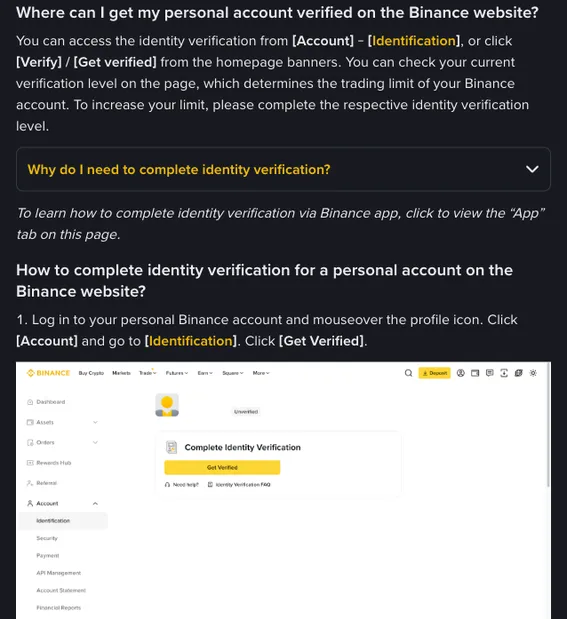
A few habits make the wait easier:
- Check the status page rather than refreshing endlessly. The page tells you the truth; the spinner doesn't.
- Watch your email and in-app notifications. Approval and "we need something else" messages usually arrive there first. Make sure you're using an email you actually check, and that security alerts aren't going to spam.
- Don't resubmit repeatedly while it says pending. Submitting again over and over can reset your place in the queue or confuse the review. If it's pending, leave it alone.
The exchange keeps its own up-to-date help articles on identity verification and current processing expectations, which is the authoritative place to confirm what's normal right now, since timelines and steps change over time. For the general backdrop on why this check exists at all, Binance Academy's explainer on KYC is a clear, neutral read on the international anti-money-laundering standards behind it. The FTC's identity-theft resources are also worth a look if you're ever worried about whether a verification request is genuine.
What to do if it's stuck or rejected
Most verifications resolve on their own inside the windows above. But if yours genuinely stalls well beyond 48 hours, or comes back rejected, here's the calm, practical fix-it order.
If it's rejected
A rejection isn't the end — it's usually a fixable, specific problem, and the exchange typically tells you roughly what went wrong. The key move is to read that reason and fix that exact thing, rather than blindly re-uploading the same photo and hoping. The common fixes:
- Details didn't match? Correct the typed information so it matches your ID precisely — every character.
- Photo unclear? Retake it in better, even light, flat, with all corners visible and no glare or fingers in the way.
- Selfie failed? Redo it in good light, no hat or sunglasses, facing the camera straight on, following the prompts unhurried.
- Document not accepted? Try a different valid government ID (passport, national ID, or driver's licence) that's current and undamaged.
Fix the one named issue, resubmit once, and you'll usually clear it on the next pass.
If it's genuinely stuck
If you're well past the normal window with no movement and no rejection message, work through this:
- Confirm there's no pending action on your side. Check the status page and your email for a "we need more from you" request you might have missed — that's the most common cause of a "stuck" review that's actually waiting on you.
- Give it the full window first. If it's a busy period and you're only a little past 48 hours, the most likely outcome is that it simply completes. Resubmitting can reset your queue position, so don't.
- Then contact support. If it's clearly beyond normal and nothing is pending on your end, reach out to official support through the app or website. Use only the in-app or on-site support channel — never anyone who DMs you offering to "speed up" verification, which is always a scam.
If a stranger messages you offering to "verify your account faster," approve it for a payment, or asks for your password, codes, or a remote-access session — it's a scam, every time. Real verification happens only inside the official app or website. Learn the patterns in our guide to spotting crypto scams, and the U.S. FTC keeps a plain-English page on crypto scams worth a read.
Make the wait productive
A pending review is a perfect window to set up the things that actually protect your account, so you're ready the moment you're verified:
- Turn on 2FA with an authenticator app (not SMS, which can be hijacked through SIM-swap attacks). Save the backup key somewhere safe and offline.
- Plan your first funding method. A bank transfer is usually cheaper than a card — our first-crypto walkthrough compares the options.
By the time the "verified" badge appears, you'll have a secured account ready to fund and trade, instead of scrambling through the security settings in a rush. And if you're brand new to all of this, the how to buy your first crypto guide picks up right where verification leaves off — funding cheaply, placing a first spot order, and keeping it safe. A reminder while you're at it: crypto is volatile and you can lose money, so start with an amount that wouldn't hurt to lose.
FAQ
How long does Binance verification take on average?
Submitting your documents is the quick part. Binance's Help Center says the review is usually done within 48 hours, and it can take longer when queues are long. The biggest factor in landing on the fast end is an accurate, well-lit first submission.
How can I keep verification from being slowed down?
Binance doesn't promise a particular speed; its Help Center only says the review is usually done within 48 hours. What you control is the first submission: details that match your ID exactly, a clear photo, and a selfie taken in good light. Getting those right first time keeps it from being sent back and queued all over again.
Why is mine taking so long?
Usually one of: a busy queue (not your fault, just wait), a detail or photo issue that triggered a closer look, region-specific extra checks, or a pending request from the exchange you haven't answered yet. Check your status page and email first — the "stuck" review is often actually waiting on you.
How do I check my verification status?
Open the identity or verification section in the app or on the website. It shows whether you're pending, verified, or need to fix something. Check there and your email rather than refreshing repeatedly, and don't resubmit while it says pending.
What if I get rejected?
Read the reason the exchange gives and fix that specific thing — correct a mismatched detail, retake a clearer photo, redo the selfie in good light, or use a different valid ID. Then resubmit once. Most rejections clear on the next attempt.
Can I pay someone to speed it up?
No, and anyone offering to is a scammer. Verification happens only inside the official app or website, and no legitimate party will fast-track it for a fee or ask for your password or codes. If in doubt, contact official support through the app, never through a DM.