Bought on Binance and your balance looks short? Where the spot fee comes out, and what to do with the leftover
You ordered a round amount, the order filled, and the balance shows a slightly smaller, oddly specific number. Then you try to sell all of it and a sliver refuses to move. Neither is a bug. Here's where the fee is taken, where to see the exact charge, and whether the leftover is worth cleaning up.
Short answer: Binance takes the spot trading fee out of the asset you receive. Buy BTC with USDT and the fee comes off the BTC, so your balance lands slightly under the amount you ordered. Nothing went missing. The gap is the fee, and the exact figure for each trade is in your Trade History. The Binance rules quoted here were checked against its help pages in September 2026.
The second surprise usually comes later. You try to sell the whole balance and a tiny remainder stays behind. That one isn't a fee: each trading pair only accepts order amounts in fixed steps, and anything smaller than one step can't go into an order. Binance's Small Amount Exchange can sweep those remainders into another coin for a flat fee. Below is how each piece works, and how to decide whether sweeping is worth it.
The fee comes out of the coin you receive
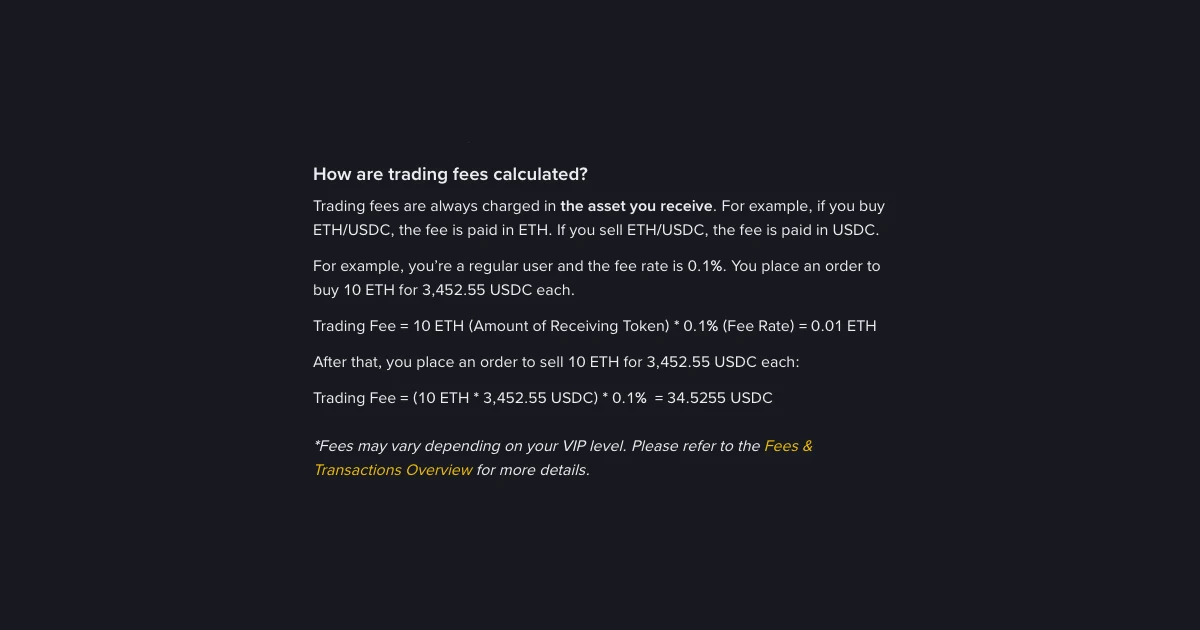
Binance's own help page, How to Calculate Binance Spot Trading Fees?, says it in one line: trading fees are always charged in the asset you receive. Its worked example uses a regular-user rate of 0.1%. That rate is there to make the arithmetic easy to follow. Your own rate depends on your VIP level and any discount you've switched on, so read it as an illustration, not as your number.
The page's example is 10 ETH traded at 3,452.55 USDC each:
| Order (page example) | Fee at the example 0.1% | What lands (no BNB deduction) |
|---|---|---|
| Buy 10 ETH | 10 ETH × 0.1% = 0.01 ETH | 9.99 ETH |
| Sell 10 ETH for 34,525.5 USDC | 34,525.5 USDC × 0.1% = 34.5255 USDC | 34,490.9745 USDC |
The fee column is Binance's. The last column is plain subtraction from those figures, so you can redo it with a calculator. If you ordered a round amount and the balance shows a slightly odd number just under it, this is almost always the reason.
Buying or selling: which side pays
The rule stays the same whichever way you trade. Only the asset you receive changes. On a buy you receive the coin, so the fee is taken in the coin. On a sell you receive the currency the pair is quoted in, such as USDT or USDC, so the fee comes out of those proceeds and the coin side matches what you sold.
That's why people mostly notice it on buys. A stablecoin balance that ends up slightly smaller rarely draws attention. A coin balance with an unexpected tail of decimals looks like something broke.
It matters later, too. If you plan to sell exactly what you bought, the amount you have to sell is the post-fee figure, not the number you typed into the buy order.
Est. Fee is a guess; Trade History is the bill
Before you place an order, the trading panel shows an Est. Fee line. Binance's fee page says plainly that this is for reference only. The actual fee depends on how much you receive once the trade executes. A limit order can fill in parts, and a market order placed by total can fill at a slightly different price from the one on screen. The estimate can't know either in advance.
The fee you were actually charged is recorded in Trade History. Find the order there and look at its fee. If the order filled in several parts, you may see several lines, and together they add up to the fee for that order. Menu labels may differ slightly in your app version, but the name Trade History is the one to look for.
Paying fees in BNB: what changes, and when it doesn't
Binance's FAQ How to Use BNB to Pay for Fees and Earn up to 25% Discount? describes a discount of up to 25% on spot trading fees, valid until further notice. It depends on two things. You need BNB in your Spot Account, and the [Using BNB Deduction] setting must be on. On the website that FAQ points to the Fee Level toggle on the spot trading page. In the app it's under Account Center, then Settings, then BNB Discount.
The same FAQ says fees are usually charged in the coin you receive and then converted into BNB. Its example reuses the 10 ETH buy: the original fee is 0.01 ETH, while the BNB deduction works out to 10 ETH × 0.075% = 0.0075 ETH, converted into BNB.
Three things still catch people out:
- Est. Fee still shows the coin you receive. The FAQ explains that the order panel keeps showing the estimate in the receiving token, because the filled amount isn't known when you place the order. That isn't a sign the setting failed.
- Not enough BNB means the normal fee. If your BNB balance runs short, you're charged the original fee. The toggle alone does nothing.
- Some trades don't qualify. Trades in tokens worth less than 0.00000001 BNB are excluded. Trading bots take the standard fee first and refund the difference to your Spot Account.
Whether to keep BNB around for this is a separate decision: you'd be holding a volatile coin to trim a fee. Crypto Trading Fees Explained: Maker, Taker & More covers how rates and discounts fit together.
Four gaps that aren't the spot fee
If the gap is bigger than a fee could explain, one of these is more likely:
- A market order. It fills against whatever is on the order book, so your average price can drift from the quote you saw. That's slippage, not a charge. How to choose between market, limit and stop-limit orders explains when it matters.
- An open order. Unfilled limit orders hold funds until they fill or you cancel them, so part of the balance can look missing while it's sitting in open orders.
- A card purchase. It isn't a spot order, so the spot fee rule above doesn't describe it. Compare what arrived against the final confirmation screen you accepted, not against a chart price. Buy Crypto With a Card: Fees, Speed and Gotchas goes through the differences.
- A Convert trade. Convert works from a quote rather than an order book. You get what the quote said when you accepted it, which won't match a spot price you saw a minute earlier to the last decimal.
Why the last bit won't sell
You bought, the fee came off, and now you want out. You drag the slider to 100% and a small remainder stays behind. Binance's page Binance Spot Trading Limits and Parameters answers this directly: what you can buy or sell depends on the pair's minimum amount movement, not on the smallest amount you're allowed to hold.
The page uses BNB/USDT as its example. Order amounts on that pair move in steps of 0.001 BNB, while a balance can hold as little as 0.00000001 BNB. Balances don't have to fit the step, but orders do. Take a made-up balance of 0.0123456 BNB. The most you could sell in one order is 0.012 BNB, and 0.0003456 BNB stays behind because it's smaller than one step. Nothing on the sell screen changes that.
Those values are the page's example, and parameters differ from pair to pair. Look up your own pair instead of copying them:
- Website: open the spot trading page, click the settings icon, choose [Trading Parameters], then [View More].
- App: go to [Trade], then [Spot], tap [...], then [Trading Parameters] and [View More].
The same page also lists each pair's minimum price movement and minimum order size, and a sell that's too small can be refused on that ground too. So one figure you've read somewhere isn't a safe rule for every pair. For the buying side, see Minimum amount to buy Bitcoin on Binance. For any specific pair, the parameters page is the number to trust.
Small Amount Exchange: is sweeping the dust worth 2%?
Binance calls these remainders dust and has a tool for clearing them. Its FAQ How to Convert Small Account Balance to BNB, BTC, ETH, USDT, USDC, U and BFUSD? sets out the rules:
| Rule | What the FAQ says |
|---|---|
| Which balances qualify | Valued below 20 USDT; most tokens are supported, but not every one |
| What you can convert into | BNB, BTC, ETH, USDT or USDC (the page title also lists U and BFUSD) |
| Fee | Flat 2%; alpha tokens carry a flat 10% |
| How often | Once every hour |
| Wallets it works on | Spot, Funding and Alpha |
| Where the result goes | Your Spot Account; past conversions appear under [History] |
On the website, go to [Assets], then [Spot], then [Small Amount Exchange]. Choose the target coin, tick the balances you want to clear, then press [Convert] and [Confirm]. There's also a display setting (5, 10 or 20 USDT equivalent) for which small balances appear in the list. Menu names may differ slightly in your app version.
On amounts this small, 2% is tiny. On dust worth 3 USDT, for example, the fee would be 0.06 USDT. At that size, the real question is whether the clutter bothers you enough to pay anything:
- Sweep it if you want a clean asset list, or you'd rather have the value in one coin than spread across several fragments you'll never trade.
- Leave it if the remainder is in a coin you still hold and plan to add to. Your next buy lands on top of it, and it stops being a separate problem.
- Think twice about alpha tokens, where the flat fee is 10% instead of 2%.
The once-an-hour limit rarely matters. Just remember that if you sweep and then create new dust straight away, you'll have to wait before sweeping again.
A 30-second check before your next order
- Know your own rate. Your VIP level and BNB setting decide it, not the example on a help page. Put your trade size and rate into the Crypto trading fee calculator to see the fee in dollar terms, and untick any discount that isn't switched on for your account. It works in USD or USDT, so on a buy, remember the real deduction will come out of the coin.
- If you'll sell later, find your exit price. The Break-even calculator takes your buy price and fee per side and gives you the sell price that covers both.
- If you'll exit completely one day, check the step size now. A glance at the pair's minimum amount movement tells you whether a remainder is likely, which is less irritating than finding out afterwards.
For what you paid: Trade History, not Est. Fee. For what you can sell: the pair's [Trading Parameters], not the balance line.
FAQ
Why did I get less crypto than I bought on Binance?
Binance charges spot trading fees in the asset you receive. On a buy that's the coin, so your balance lands just under the amount you ordered. Trade History shows the exact fee for that order.
Does the 0.1% on Binance's help page apply to me?
Not necessarily. Binance's page uses 0.1% as a regular-user example to show how the calculation works. Fees vary by VIP level and by discounts such as BNB deduction, so check the fee level shown for your own account rather than assuming the example.
Does paying fees with BNB change what I receive?
It can lower the spot fee by up to 25%, as long as you hold enough BNB in your Spot Account and have BNB deduction switched on. Binance says the fee is usually charged in the coin you receive and then converted into BNB. Trade History shows exactly how the fee on each trade was recorded.
Why doesn't Est. Fee match what I was charged?
Est. Fee is for reference only. The real fee depends on the final amount you receive once the order executes, and that can differ from the estimate when the order fills in parts or at a slightly different price.
Why can't I sell my whole balance?
Order amounts on each pair move in fixed steps, called the minimum amount movement, while your balance can hold far smaller fractions. Whatever is left below one step can't go into an order. Check the step for your pair under Trading Parameters.
Is Small Amount Exchange free?
No. Binance charges a flat 2% on dust conversions, or 10% for alpha tokens. It covers balances valued below 20 USDT and can be used once every hour.