What an Expired status on a Binance spot order tells you
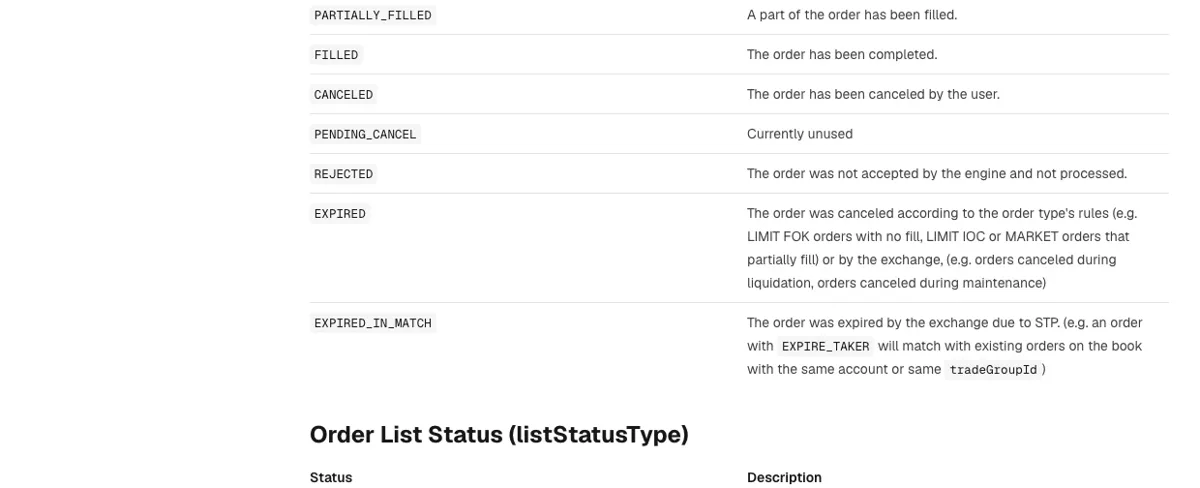
Binance uses the EXPIRED status for an order that was closed without you pressing cancel. There are two ways that happens. Either the order type's own rules ended it, as with a LIMIT FOK order that got no fill or a LIMIT IOC or MARKET order that filled only partly, or the exchange cancelled it, for example during liquidation or maintenance.
Look at the filled amount before anything else. Whatever traded is yours, and only the remainder expired. If the filled amount is zero, nothing changed hands. Then look at the order type. A market, IOC or FOK order that expires is doing what it was built to do. A plain limit order set to Good Til Canceled is meant to wait on the book until it is cancelled, so when one of those expires, the cause is somewhere else: the price range rule, an OCO partner, self-trade prevention or an exchange-side cancel.
An identical market order sent again on the same pair can expire for the same reason. Change the size or switch to a limit order before you send it.
How an expired order differs from a cancelled or rejected one
Three status words can look alike in a trade history, and they come from different places. CANCELED means you cancelled the order yourself. REJECTED means "the order was not accepted by the engine and not processed." EXPIRED means the order was accepted and then closed by its own type rules or by the exchange. A fourth status, EXPIRED_IN_MATCH, belongs to self-trade prevention and is covered further down.
A rejected order never reached the order book, so it needs a different fix from an expired one. Binance Academy's guide to spot trading rules lists the usual triggers. An order that fails a filter check is rejected with an error code naming the filter. Orders below the pair's minNotional are rejected. A pair's MAX_NUM_ORDERS filter caps how many open orders you can hold on it, and an order past that cap is rejected. Prices or quantities that don't fit the pair's tick size or step size are rejected as well.
One of those filters, PERCENT_PRICE_BY_SIDE, sets a valid range for the order price relative to the average of previous trades. A limit price typed far away from where the pair has been trading can therefore be refused at submission. That is a rejection. The price range rule in the third section below works later, while the order is matching, and it produces an expiry.
Market, IOC and FOK orders expire whatever they can't fill straight away
The time-in-force setting decides how long an order is allowed to wait. Good Til Canceled keeps an order on the book until it is cancelled. Immediate Or Cancel tries to fill as much as it can before the order expires. Fill Or Kill expires if the full order cannot be filled when it executes. A market order is grouped with the IOC case in the status list: when it fills only partly, the rest expires.
Here is how that looks with made-up numbers. Suppose you send a market buy for 1,000 USDT on a quiet pair and it fills 640 USDT before it runs out of sell orders it can match. The order ends as EXPIRED with 640 USDT filled. The other 1,000 − 640 = 360 USDT of the order did not trade. When the order book simply didn't hold enough to match, the expiry reason attached is INSUFFICIENT_LIQUIDITY, explained as "not enough orders in the order book to match with this order."
A FOK order works as all or nothing. A LIMIT FOK with no fill expires in full and nothing trades. If you picked FOK for a size the order book couldn't take in one go, a smaller size or a regular limit order are the options left.
To finish a partly filled market order, place a new order for the remainder. A limit order at a price you are prepared to pay keeps each fill at that price or better, though it may wait on the book instead of filling at once. How to choose between market, limit and stop-limit orders compares the three types if you are unsure which one fits.
Why a large order can expire under Binance's price range execution rule
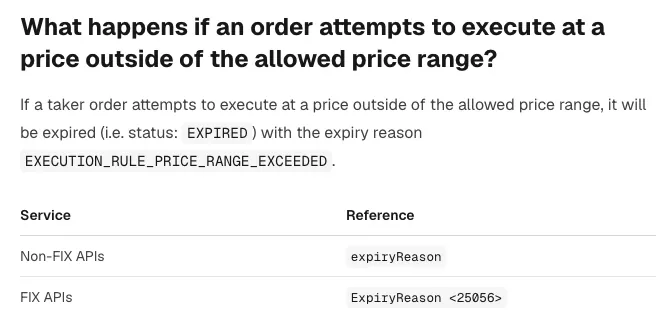
Spot pairs on Binance run under an execution rule that limits how far from a reference price a trade may happen. In the developer FAQ's words, the rule "ensures that trades may only be executed at prices within and equal to a price range around a reference price." If a taker order tries to trade outside that range, it is expired with the reason EXECUTION_RULE_PRICE_RANGE_EXCEEDED.
When the matching engine calculates the reference price, it is a simple moving average of trade prices over a time window. Some pairs use a reference price calculated outside the engine instead, by one of several numbered methods. The range itself comes from multipliers above and below that price. The FAQ's own example uses a reference price of 10.00 with multipliers of 2.0 and 0.5 for both buys and sells:
- highest allowed trade price: 10.00 × 2.0 = 20.00
- lowest allowed trade price: 10.00 × 0.5 = 5.00
Those values are labelled fictional, so don't assume any real pair allows a move of double or half. The limits are fixed for each order at the moment it starts taking liquidity: the reference price is recalculated when an order enters its taker phase, and those limits hold for that whole phase, even though a single taker order may match many resting orders along the way.
Follow those two points through and one situation stands out, a large market order on a pair with few resting orders. It works its way through the book level by level, and once the next resting order is priced outside the band, whatever is left expires with this reason. That case is our reading of the two rules on a thin order book.
The rule is not enforced on a pair that has no PRICE_RANGE rule, no reference price, or a reference price of null. Where it is enforced, the practical fixes are a smaller order, or a limit order priced near the current market so the order cannot chase the price too far. API users can read the live values from GET /api/v3/executionRules and GET /api/v3/referencePrice. Following the reference price over WebSocket Streams is the recommended route, since it changes continually.
Did an OCO leg or your own resting order cause the expiry?
On an OCO, an expired leg is normally the design working. The OCO_TRIGGER reason covers an order from an OCO pair that "was canceled because the other order of the pair started working or the entire OCO expired." Check which leg filled before you worry about the other one. How to Place an OCO Order on Binance Spot walks through how the two legs are linked. Order lists built as OTO have a similar reason, OTO_PHASE_ONE_EXPIRED, used when the working order of the list expired and took the whole list with it.
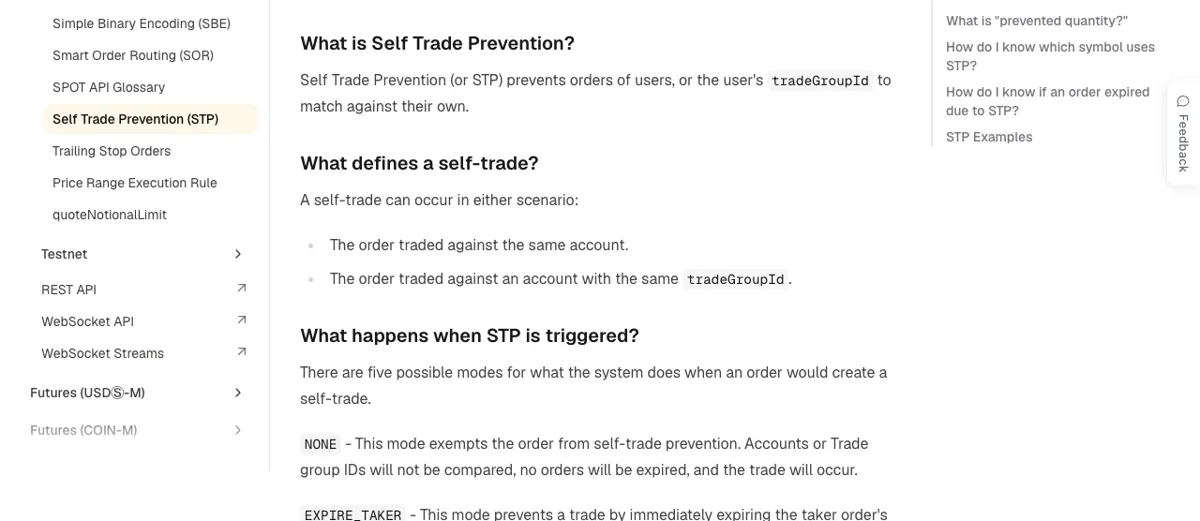
EXPIRED_IN_MATCH points to self-trade prevention, a check that stops an account trading with itself. One listed example is an order set to EXPIRE_TAKER matching with orders already on the book from the same account or the same tradeGroupId. In practice, look for an older order of yours on the opposite side of the same pair at a price your new order would have hit. Cancel or move that one first if you really mean to cross it.
EXCHANGE_CANCELED is the plain case: the order was cancelled by Binance. Liquidation and maintenance are the examples given for exchange-side cancels. If a limit order you never touched expired and none of the reasons above fits, check the exchange's announcements for maintenance on that pair around the time it expired, and send the order ID to customer support if you find nothing.
Matching the expiry reason code to what happened
Order queries through the API may include an expiryReason field, returned only for expired orders, on GET /api/v3/order, GET /api/v3/allOrders and the WebSocket API's order.status and allOrders. The user data stream carries it as eR. Even if you only use the app, each code maps to one of the cases above, which makes the list a quick way to narrow down your own order.
| Expiry reason | What the code means | What to check next |
|---|---|---|
| UNFILLED_IOC_QUANTITY_EXPIRED | The IOC order was not fully filled | Filled amount; place the remainder as a new order |
| UNFILLED_FOK_ORDER_EXPIRED | The FOK order was not fully filled | Size against the order book; try smaller or a limit order |
| INSUFFICIENT_LIQUIDITY | Not enough orders in the book to match | A thin pair; a limit order that can wait |
| EXECUTION_RULE_PRICE_RANGE_EXCEEDED | The order tried to trade at a price outside the price range rule | Order size and how far price moved from the reference price |
| OCO_TRIGGER | The other order of the OCO started working, or the whole OCO expired | Which leg filled |
| OTO_PHASE_ONE_EXPIRED | The working order of the list expired, so the list expired | Why the first order expired |
| REJECTED | A contingent or OTO order was rejected when placed; lack of funds and filters are the common reasons | Balance and the pair's filters |
| EXCHANGE_CANCELED | The order was cancelled by Binance | Maintenance notices; support with the order ID |
The expiry reason list has no code for self-trade prevention; the EXPIRED_IN_MATCH status itself is the signal.
What else can stop a Binance spot order from trading
Can a Good Til Canceled order on Binance expire?
It won't expire because time ran out. A GTC order stays on the book unless it is cancelled. It can still end up expired for reasons unrelated to time: a cancel by the exchange during maintenance or liquidation, the other leg of an OCO taking over, self-trade prevention, or a taker fill that would break the price range rule.
Where can I find the price range for a Binance trading pair?
Binance publishes it through its spot API. GET /api/v3/executionRules returns the allowed range and GET /api/v3/referencePrice returns the current reference price. The reference price keeps changing, so following it over WebSocket is the suggested route. The 10.00 example with 2.0 and 0.5 multipliers in the developer FAQ uses made-up values.
What happens to a Limit Maker order that would fill straight away?
It is rejected and never placed. A Limit Maker is a limit order accepted only when it would be placed on the order book as a maker order. If it would trade at once against an existing order as a taker, it is rejected. Move the price so it no longer crosses the best opposite order and submit it again.